




Table of Contents
- How robots.txt Manages Crawlers Today
- What Is llms.txt (and What Problem Does It Solve)?
- Where llms.txt and robots.txt Overlap (and Where They Don't)
- Evidence That llms.txt Works
- Should You Implement llms.txt?
- How To Prepare Your Site for AI Search (Regardless of llms.txt)
- The Standard That Matters Most Isn't a File
- Frequently Asked Questions
If you follow SEO discussions on LinkedIn, Reddit, or X, you’ve likely noticed the debate around llms.txt. Some practitioners call it the next essential standard for AI visibility, right alongside robots.txt and sitemap.xml. Others compare it to the keywords meta tag: a well-intentioned idea that search engines ultimately ignored.
The split makes sense. We’re in the early stages of a fundamental shift in how people find information. ChatGPT prompt volume grew nearly 70% in just the first half of 2025, and click-throughs from ChatGPT answers tripled between March and June, according to Bain & Company research using Sensor Tower data. AI-powered search isn’t a future concern; it’s already reshaping how users discover content and make decisions.
At the center of this shift are two plain-text files with very different purposes. robots.txt, the 30-year-old standard, controls which crawlers and bots can access parts of your site. llms.txt, a new standard proposed by Answer.AI co-founder Jeremy Howard in September 2024, curates your most important content in a markdown file designed for large language models and AI systems to parse efficiently.
The question isn’t whether one replaces the other; it’s whether llms.txt adds enough value to justify implementation right now. I’ll lay out the evidence here and help you decide for your site.
| robots.txt vs. llms.txt vs. sitemap.xml | |||
|---|---|---|---|
| Feature | robots.txt | llms.txt | sitemap.xml |
| Purpose | Controls crawler access permissions | Curates content for AI comprehension | Lists all indexable URLs |
| Format | Plain text with directives | Markdown with structured headers | XML |
| Primary audience | Search engine crawlers, AI bots | Large language models, AI agents | Search engine crawlers |
| How it’s used | Crawlers check before accessing pages | AI systems reference for context and navigation | Crawlers use to discover page URLs |
| Required? | No, but strongly recommended | No, not yet widely adopted | No, but strongly recommended |
| Key limitation | Controls crawling, not indexing | No major AI provider formally parses it | Doesn’t prioritize or describe content |
How robots.txt Manages Crawlers Today
The robots.txt file has been the foundation of crawler management since 1994. Based on the robots exclusion protocol (also called the robots exclusion standard), it’s a plain-text file placed in a site’s root directory that tells web crawlers which pages they can and can’t access. While the protocol was originally designed for a web populated by crawlers from Yahoo, AltaVista, and other early search engines, it remains just as relevant in the age of AI.
Key Directives and Syntax
If you’ve worked in technical SEO, you’re familiar with the core robots.txt rules. The file uses a simple syntax that search engine crawlers parse before accessing your site:
- User-agent. Specifies which crawler the rules apply to (e.g., Googlebot, Bingbot, or * for all).
- Disallow. The primary directive. A disallow rule tells crawlers not to access specific paths, subdirectories, or an entire site.
- Allow. Overrides a disallow for specific pages within a blocked directory.
- Crawl-delay. Requests that crawlers wait a specified number of seconds between requests (not honored by all bots).
- Sitemap. Points crawlers to your sitemap.xml file.
You can use robots.txt to block parts of your site (like staging environments or admin pages) or use wildcard patterns to manage subdomain and subdirectory access at scale. A typical robots.txt for www.example.com might block crawlers from /admin/, /staging/, and specific file types like .php scripts that aren’t meant for indexing.
Anyone can create or edit a robots.txt file with a basic text editor. The syntax is straightforward, but small errors (a misplaced slash, a missing user-agent line) can accidentally block pages you want indexed and reshape crawler behavior in unintended ways.
How Search Engine Crawlers Use robots.txt
When Googlebot, Bingbot, or other search engine crawlers reach your site, the first thing they do is check for robots.txt at the root domain. They parse the directives to determine which URLs to crawl and which to skip.
This matters for crawl budget, the total number of pages a search engine will crawl on your site within a given timeframe. For large sites, efficient use of robots.txt ensures crawlers spend their crawl rate on high-value pages rather than wasting it on blocked pages, duplicate content, or low-priority sections. You can monitor how crawlers interact with your site through Google Search Console, which shows crawl stats, blocked resources, and indexing issues.
It’s worth noting that robots.txt controls crawling, not indexing. If a page is linked from elsewhere, Google Search can still index it even if robots.txt blocks the crawl. To prevent indexing entirely, you need page-level directives: noindex meta tags in the HTML, an x-robots-tag in the HTTP header, or both. These controls work on individual HTML files and pages, while robots.txt operates at the crawler level.
For webmasters dealing with unwanted bots (scrapers, spam crawlers, or other bad actors), adding a badbot user-agent block is common practice, even if malicious crawlers often ignore it.
AI-Specific Crawler Directives
This is where robots.txt intersects with the AI search landscape. Major AI companies have introduced dedicated crawler user agents that website owners can manage through robots.txt:
- GPTBot (OpenAI)
- ClaudeBot (Anthropic)
- Google-Extended (Google’s AI training crawler)
- CCBot (Common Crawl, used by many AI training datasets)
If you want to allow traditional search crawling but block AI training crawlers, you can add specific disallow rules for these user agents. This distinction matters because allowing Googlebot while blocking GPTBot gives you control over how your content is used without sacrificing search visibility.
Your web server logs will show which AI crawlers are hitting your site and how frequently. For most website owners, reviewing those logs is the first step in understanding your site’s relationship with AI systems.
What Is llms.txt (and What Problem Does It Solve)?
Jeremy Howard, co-founder of Answer.AI, published the llms.txt proposal on September 3, 2024. The concept is simple: a markdown file placed at your site’s root directory (/llms.txt) that gives AI systems a curated overview of your most important web content.
Unlike robots.txt, which manages access, llms.txt is about comprehension. It’s designed to help large language models, AI agents, and chatbot interfaces understand what your site offers and where to find the most useful resources.
How llms.txt Is Structured
The file follows a specific markdown format:
- H1 header. Your site or project name.
- Blockquote. A brief summary of what the site does.
- H2 sections. Categories of content (like “API Documentation,” “Guides,” or “Endpoints”), each containing bulleted links to relevant pages.
- Optional section. Content that AI models can skip when context windows are limited, marked with a specific H2 header.
The syntax is intentionally simple. There’s no schema, no XML, no structured data markup required. It’s plain text in markdown, readable by both humans and AI systems. The file acts as a curated map of your site’s most important docs, API reference content, and resources, organized with headers and metadata that help AI models navigate efficiently.
llms-full.txt and Companion Files
The original proposal also introduced llms-full.txt, a companion file that bundles all of your key content into a single markdown file. Where llms.txt is the table of contents, llms-full.txt is the full book.
Individual pages can also offer .md markdown exports alongside their HTML versions, giving AI tools a cleaner, token-efficient format to work with. These companion files address a real technical challenge: AI models work within fixed context windows, and markdown requires significantly fewer tokens to process than rendered HTML.
Where llms.txt and robots.txt Overlap (and Where They Don’t)
It’s tempting to call llms.txt “robots.txt for AI,” but that comparison breaks down quickly. These files serve different audiences, solve different problems, and operate in fundamentally different ways.
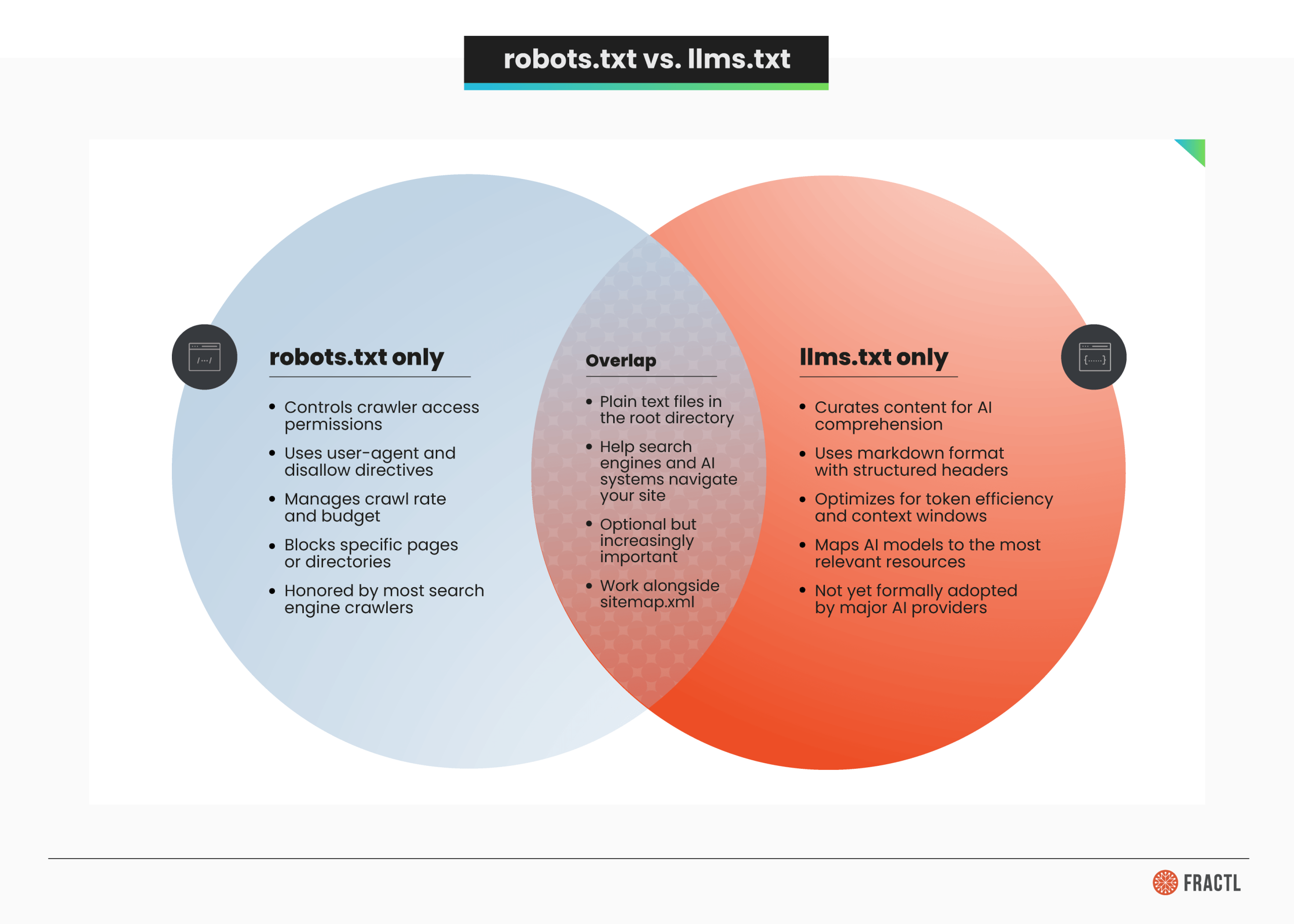
Most SEO professionals are already comfortable with the optimization cycle of robots.txt and sitemap.xml. The question is whether adding llms.txt to that stack creates meaningful value, or just adds maintenance overhead for HTML pages that AI crawlers can already read.
Evidence That llms.txt Works
The case for llms.txt rests on a few key data points. None are conclusive on their own, but together they suggest the standard could become meaningful as AI search matures.
- AI search usage is surging. ChatGPT prompt volume grew nearly 70% in the first half of 2025, and click-throughs from ChatGPT answers tripled between March and June (jumping from a 2.2% to a 5.7% click-through rate), according to Bain & Company using Sensor Tower data. AI tools like Perplexity and Gemini are following similar trajectories. This growing usage means more AI models are parsing web content at scale, and formats designed for those models could provide an edge.
- AI agents appear to use llms-full.txt. Mintlify, one of the co-creators of the llms-full.txt specification, reported that data from the answer engine platform Profound shows AI agents visit a site’s llms-full.txt over twice as much as its llms.txt. The caveat: this data hasn’t been independently verified and comes from a company with a commercial interest in the standard’s adoption.
- LangChain’s internal benchmarks favor optimized llms.txt. In a Latent Space podcast episode on context engineering for AI agents, Lance Martin of LangChain shared results from a personal benchmark comparing three approaches to giving coding agents access to documentation: vector store indexing, llms.txt with a file loader tool, and context stuffing. The optimized approach outperformed the alternatives significantly, suggesting that structured curation genuinely helps AI workflow performance.
- Major companies have adopted it. Anthropic, Cloudflare, Zapier, and other developer-focused companies already publish llms.txt files. The strongest adoption is concentrated among API documentation platforms and developer tool providers, where structured, token-efficient content delivery matters most.
- The use cases are real (for the right sites). For sites with extensive API documentation, developer docs, or large content archives, llms.txt provides a clear map that AI assistants and chatbot interfaces can use to surface the most relevant content.
Fractl’s co-founder, Kelsey Libert, has written about how to optimize content strategy for AI-powered SERPs and LLMs, and llms.txt fits into that broader shift toward making content AI-ready across channels.
Evidence That It Doesn’t (or Doesn’t Yet)
The skeptical case is equally compelling and backed by more concrete evidence.
- The Reboot Online experiment found zero AI bot visits. Reboot Online ran a controlled study across two domains, publishing test pages referenced only in their llms.txt files. After three months of monitoring server logs, no AI bots visited the llms.txt files on either site, and none of the test pages were discovered through llms.txt. AI bots were actively crawling other pages on both sites during this period; they just weren’t checking for llms.txt.
- Google doesn’t endorse it. Google’s John Mueller confirmed on Bluesky that the presence of llms.txt on some Google properties is “not” an endorsement. The Google Search team actively removed an llms.txt file from its developer docs after a CMS platform auto-generated one. Mueller’s message was direct: Google won’t use it.
- Mueller compared it to the keywords meta tag. In comments reported by Search Engine Journal, Mueller drew a parallel between llms.txt and the keywords meta tag, a standard that search engines abandoned because it was too easy to manipulate and provided little real value.
- No major AI provider has formally committed to parsing it. OpenAI, Anthropic, Google, and Meta haven’t included llms.txt in their official crawler documentation as a formally recognized standard. The proposal remains exactly that: a proposal listed at llmstxt.org but not adopted into any provider’s specification.
- Community sentiment is divided. Reddit threads and LinkedIn discussions reflect genuine skepticism from SEO practitioners. In Kelsey Libert’s research on what 75 SEO thought leaders reveal about the GEO debate, the industry showed significant volatility around which AI-era optimizations are worth pursuing and which are noise.
Should You Implement llms.txt?
Whether llms.txt makes sense depends on what kind of site you run and what your content looks like.
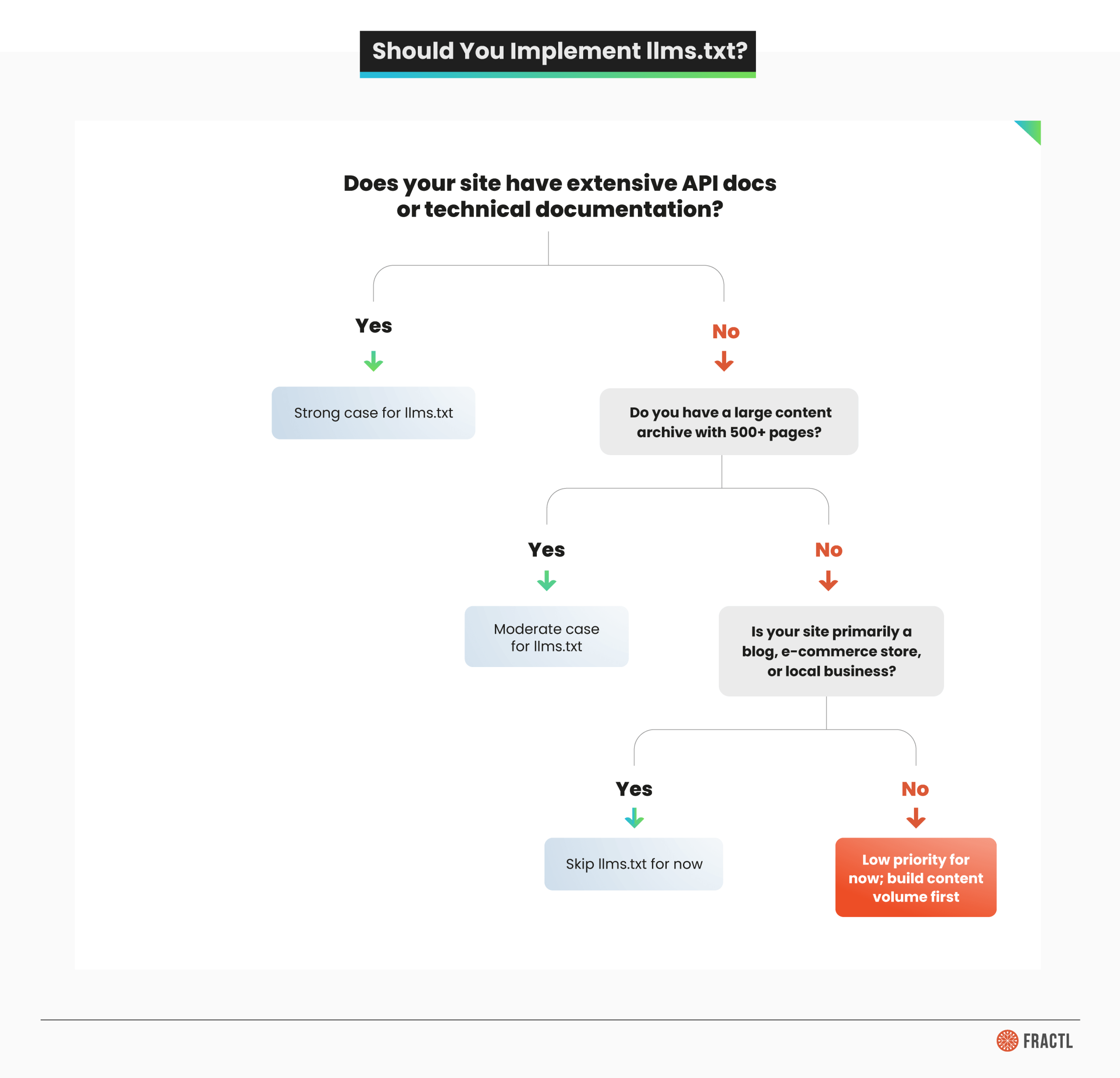
Here’s when llms.txt makes the most sense:
- API documentation and developer platforms. If your site has extensive docs, API reference pages, tutorials, and endpoints that developers or AI agents need to find quickly, llms.txt provides genuine value. This is where adoption is strongest, and the use case is clearest.
- Large content archives. Sites with hundreds or thousands of pages benefit from curation. An llms.txt file acts as an editorial guide, pointing AI models to your most important and current content rather than letting them crawl through outdated material.
- Documentation-heavy SaaS products. If your product’s value depends on users (or AI assistants) finding the right help docs, functions, or workflow guides, structured markdown access is a meaningful optimization.
And here’s when you can skip it (for now):
- E-commerce sites. AI shopping queries are growing fast, but current evidence doesn’t show AI models using llms.txt to surface product pages. Your resources are better spent on structured data and schema markup.
- Local businesses. If your digital presence is a brochure site, llms.txt adds zero value.
- Content publishers with standard blog formats. If your site is primarily articles and blog posts without complex documentation, traditional SEO and sitemap.xml coverage will serve you better.
Quick Implementation Guide
If you decide to implement, the process is straightforward:
- Create a markdown file named llms.txt in your root directory.
- Add an H1 with your site or project name and a blockquote summary.
- Organize your most important content into H2 sections with bulleted links.
- Consider creating an llms-full.txt with the complete content of key pages.
- Place both files at your domain root (example.com/llms.txt).
You can write the file manually in any text editor or use an llms.txt generator tool. WordPress users can find open source plugins that handle automation of the generation process, though you should review the output to ensure it reflects your content priorities rather than auto-generating from every page. For sites built with JavaScript frameworks, make sure the files are served as static assets from your web server, not rendered client-side.
How To Prepare Your Site for AI Search (Regardless of llms.txt)
Whether or not you implement llms.txt, there are proven steps to improve how AI systems understand and surface your content. These apply to every site regardless of size, industry, or technical SEO maturity.
- Audit your robots.txt for AI crawlers. Review your current file for AI-specific user agents (GPTBot, ClaudeBot, Google-Extended, CCBot). Decide deliberately whether to allow or block each one based on your content strategy, rather than leaving the defaults in place.
- Implement structured data and schema markup. AI models use structured data to understand entities, relationships, and context. Product schema, FAQ schema, article schema, and organization markup give AI systems cleaner signals about what your content represents.
- Structure content for AI readability. Clear headings, concise sections (150 to 300 words), factual lead sentences, and well-organized tables make your web content easier for both traditional search and generative AI to parse and cite. Fractl’s work on structuring content for GenAI visibility covers this approach in detail.
- Monitor AI crawler traffic. Check your web server logs for AI bot user agents. Google Search Console shows traditional crawler activity, but server-level log analysis reveals the full picture of which AI crawlers are visiting, how often, and which pages they’re accessing.
- Optimize for AI search visibility. As generative engine optimization becomes a standard discipline, focus on clear, factual, citation-worthy content. AI-generated responses increasingly cite authoritative, well-sourced material that directly answers user queries, and those citations can drive rankings alongside traditional organic results.
- Keep your sitemap.xml current. This remains the most universally supported way to help both search engines and AI systems discover your content. Automated sitemap updates ensure new pages are crawlable immediately rather than waiting for organic discovery.

The Standard That Matters Most Isn’t a File
robots.txt is essential. It’s been the foundation of crawler management for three decades, and it’s not going anywhere. With AI-specific user agents now crawling the web alongside Googlebot and Bingbot, knowing how to use robots.txt effectively matters more than ever.
llms.txt is a different proposition. The concept is sound: as artificial intelligence reshapes how people find and interact with web content, giving AI models a curated map of your site makes intuitive sense. But the evidence is mixed. The strongest data points come from companies with a commercial interest in the standard’s success, while the most rigorous independent test (Reboot Online’s three-month experiment) found no AI bot engagement at all.
My recommendation is to treat llms.txt as an early-stage signal worth monitoring, not a priority. If you run a developer platform or documentation-heavy site, the 30 minutes it takes to create an llms.txt file is a reasonable bet. For everyone else, your time is better spent on the fundamentals: content that’s clear, well-structured, authoritative, and genuinely useful.
Kelsey Libert explored how AI is reshaping SEO’s rules, with research showing the landscape remains volatile and full of competing approaches. In that environment, the best strategy is building content that performs well regardless of which file an AI model checks first.
Reach out to Frac.tl today and find out how we can help your brand build an AI-ready content strategy.
Frequently Asked Questions
What is an llms.txt file for?
An llms.txt file is a plain-text markdown file placed in a website’s root directory that helps large language models and AI systems understand and navigate a site’s most important content. Unlike robots.txt (which controls crawler access), llms.txt curates content for AI comprehension by organizing key resources into a structured, token-efficient format.
What is the difference between llms.txt and llms-full.txt?
llms.txt provides a structured overview: a table of contents with links to key pages. llms-full.txt bundles all of that content into a single markdown file, so an AI model can ingest everything without following individual links. Use llms.txt as the map and llms-full.txt as the complete resource when real-time context delivery matters.
What is the difference between robots.txt and llms.txt?
robots.txt manages crawler permissions: who can access what on your site. llms.txt curates content for AI readability: what’s most important and where to find it. They serve different audiences (web crawlers vs. AI models), use different formats (directive syntax vs. markdown), and solve different problems (access control vs. content optimization). They’re complementary, not competing.
How do you make an llms.txt file?
Create a markdown file with an H1 title and blockquote summary, then organize your most important content into H2 sections with bulleted links. Place the file at your site’s root directory (/llms.txt). You can write it manually in a text editor or use an llms.txt generator tool. WordPress users can install plugins that auto-generate the file, though you should review and customize the output to match your content priorities.